Building The Vision · Finance Tools
How to Compare Service Contract Rates Across Administrators
How to compare service contract rates across administrators fairly: same coverage, term and deductible, surcharges on, one markup, then build the menu.
To compare service contract rates across administrators fairly, you have to rate the same vehicle at the same coverage level, term, mileage and deductible, with each program's surcharges switched on and your markup applied the same way to every one. Only then does "cheapest" mean anything. Most finance offices skip at least one of those steps, because doing it by hand means logging into one administrator portal after another and holding the numbers in their head.
This guide covers what a fair comparison of vehicle service contract (VSC) rates looks like, what to weigh besides the price, and how to turn the comparison into a menu the customer can actually choose from.
Key takeaways
- Compare like for like: the same vehicle, coverage level, term, mileage and deductible.
- A rate without its surcharges is not the rate the customer will pay.
- The cheapest administrator often changes with the term and the deductible, so compare more than one.
- Price is one factor. Coverage, eligibility, limits, waiting periods and claims handling decide whether the cheapest rate is the best one.
- Apply one markup per product so every manager quotes the same price, and keep dealer cost off the customer's screen.
Why rating one portal at a time costs the store
In most stores, comparing administrators looks like this:
- Key the VIN into one portal, write the rates down, then key it again into the next one.
- Work out the markup on each rate with a calculator.
- Type the chosen rates into a separate menu system.
- After the customer decides, go back to the administrator's portal and type the deal in a third time to contract it.
- Rebuild the month's results from a spreadsheet at the end of the month.
Every one of those steps is a chance to mistype a figure, and the comparison itself happens from memory. When the lot is busy, the manager rates the one program they know best and moves on. That is how a store ends up quoting a program that is not the best fit for the vehicle in front of them, deal after deal, without anyone deciding it should.
What to compare besides the price
The lowest rate is only the right answer when everything else is equal, and it rarely is. Line these up before you look at price:
| Factor | What to check | Why it matters |
|---|---|---|
| Coverage level | Exclusionary or named component, and which level within the program | A powertrain plan and an exclusionary plan are different products at different prices |
| Term and mileage | The same term and mileage on every program, measured the same way | Longer terms change the price order between administrators |
| Deductible | The deductible you intend to present | The cheapest program at $100 may not be the cheapest at $0 |
| Eligibility and surcharges | Four wheel drive, turbo, commercial use, lift kits, mileage and age limits | Surcharges change the price, and some decide whether the vehicle qualifies at all |
| Limits and waiting periods | How the contract caps what it pays, and when coverage starts | A cheaper contract can carry a lower cap or a waiting period the customer does not expect |
| Claims experience | How quickly and fairly the administrator pays claims | To the customer, your dealership and the administrator are the same company |
Our guide to vehicle service contracts covers the coverage differences in more depth, and our post on exclusionary coverage walks through one contract line by line.
A five point check to compare service contract rates fairly
- Same vehicle details. Decode the VIN once and use the same year, model, trim and mileage everywhere.
- Same coverage level. Top coverage against top coverage, not a powertrain plan against an exclusionary one.
- Same term, mileage and deductible.
- Every surcharge that applies, switched on. Drivetrain, turbo, commercial use and anything else the vehicle triggers.
- The same markup on every rate. Compare the prices the customer would see, built the same way, so the comparison is not skewed by how one rate was rounded.
Then run the check at more than one term and deductible. The administrator that is cheapest at one setting is often not the cheapest at another.
Price consistently, and keep cost off the screen
Once you know the rates, decide your markup per product, in dollars or as a percentage over cost, and apply it to every rate the same way. Then every manager quotes the same price for the same coverage on the same vehicle. That consistency matters for more than profit: two customers buying the same product on the same day should not be offered two different prices depending on who was in the box.
Salespeople and anyone else who presents to the customer should see the price, never the dealer cost.
Turn the comparison into a menu
The point of comparing rates is to put the best options in front of the customer. Build a small number of packages from the rates you pulled, show each with its monthly payment, and present every product to every eligible customer in the same order. Our menu presentation training covers how to present that menu, and which products belong on it depends on your store.
Comparing administrators without five logins
We built EliteRater because doing this by hand on every deal is not realistic for most finance offices. It is the F&I rating and menu platform Elite FI Partners builds for its dealers, as part of Elite OS.
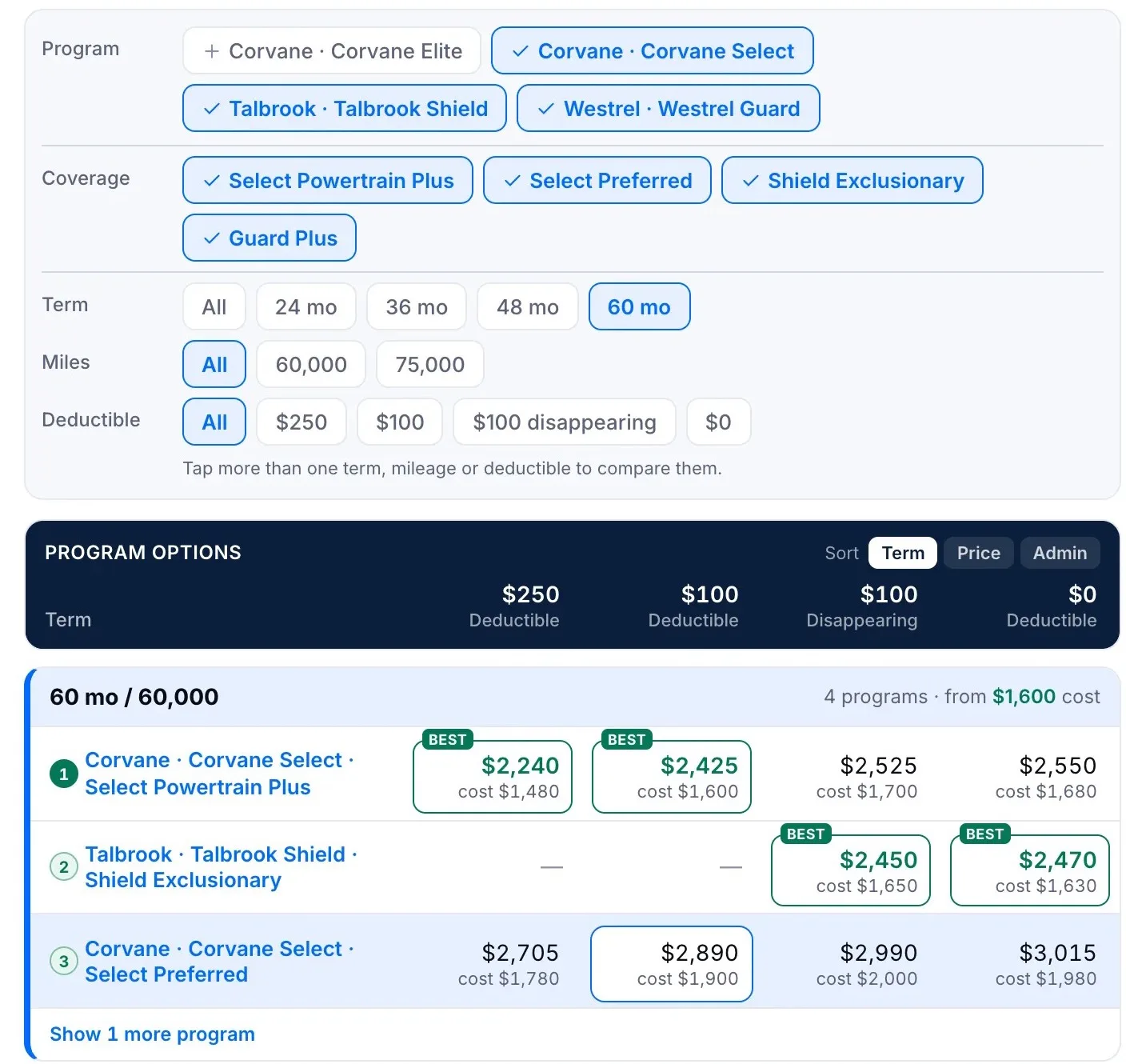
- Every administrator, one grid. Decode the VIN once and live rates come back from each connected administrator side by side, with the surcharges that apply switched on and your markup already added. Best marks the lowest cost at every term, and moves when you change the deductible.
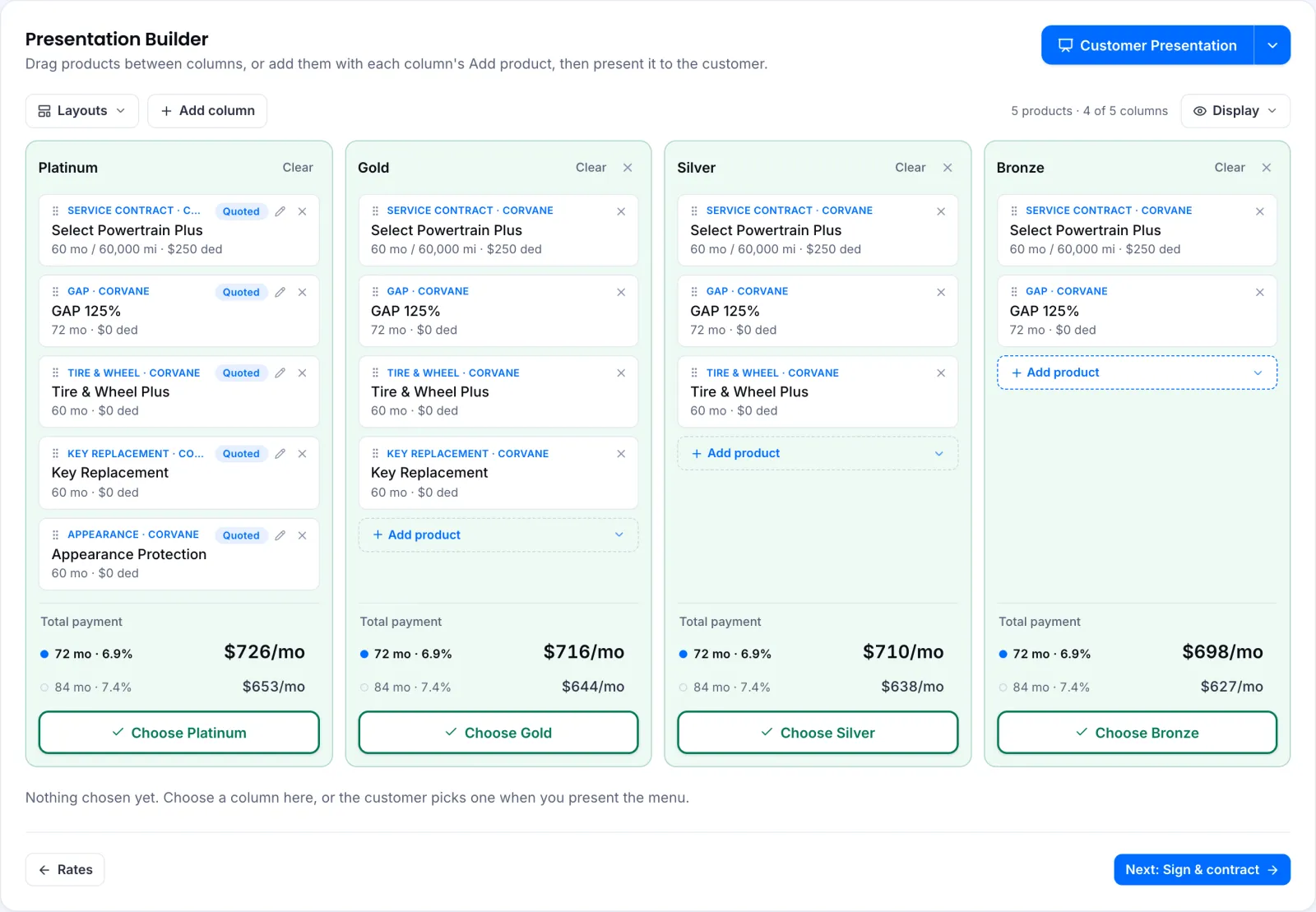
- A menu from the same rates. Up to five packages, each ending in its monthly payment, presented full screen with your price only, never the dealer cost. You can also present on the customer's own phone, email the menu or print it.
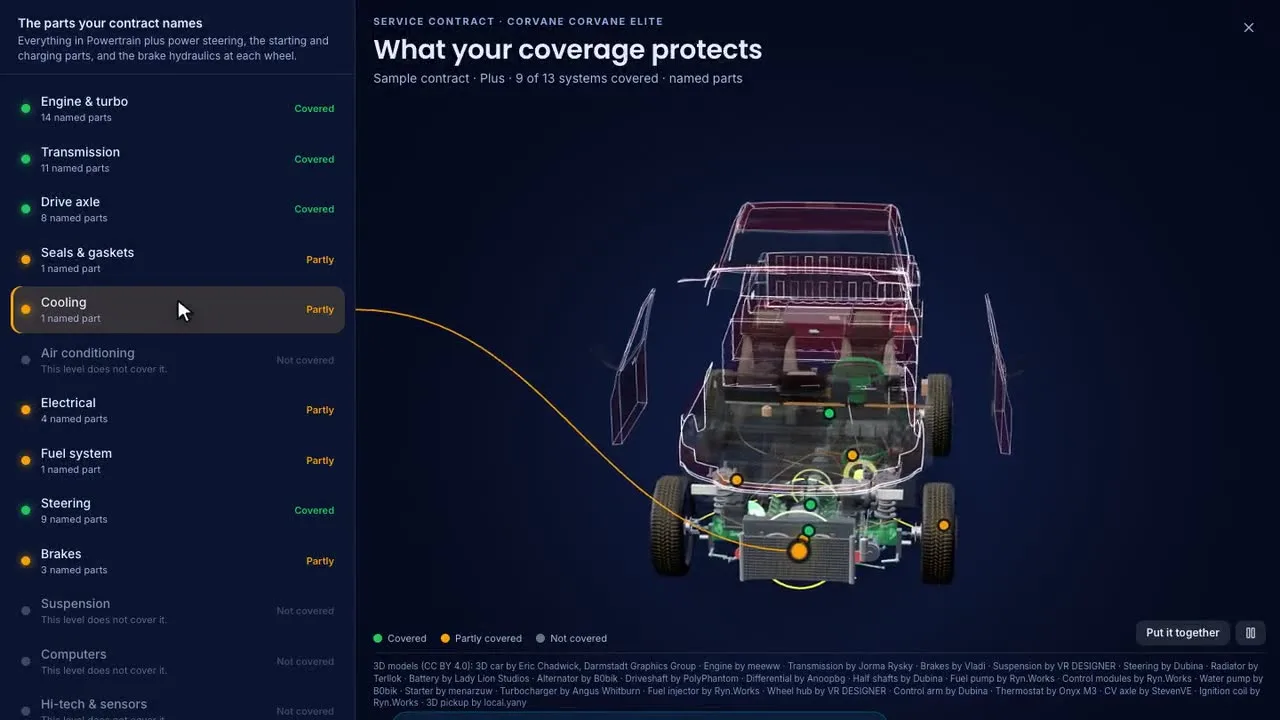
- Coverage the customer can see. For mapped programs, a 3D view of the vehicle lights up each system as covered, partly covered or not covered at that level, read from the program's own contract.
- Contracted and logged from the same deal. Contract the package the customer chose without re-keying it, where the administrator supports it, then log the sale. The dashboard shows each manager's PVR against the store.
It rates cars and trucks, motorcycles, ATVs, side by sides, personal watercraft, and motorhomes and towable RVs. Administrators are connected one at a time and each connection is tested before dealers see it, so your Elite FI agent can tell you which programs are live for your store.
Frequently asked questions
What is the fairest way to compare service contract rates?
Rate the same vehicle at the same coverage level, term, mileage and deductible, with every applicable surcharge switched on and the same markup applied. Then compare at more than one term and deductible.
Should we always sell the cheapest administrator?
No. Price is one factor. Coverage, eligibility, limits, waiting periods and how claims are paid all matter, and the cheapest rate is only the best choice when those are equal.
Why does the cheapest administrator change with the deductible or term?
Each administrator prices its rate tables differently, so the order changes as you move the deductible, term or mileage. That is why one comparison at one setting is not enough.
Is there software that compares service contract rates from several administrators at once?
Yes. Multi-administrator rating software such as EliteRater decodes the VIN once and returns live rates from each connected administrator side by side, with surcharges and your markups applied.
Can salespeople see dealer cost in EliteRater?
No. Managers, F&I and sales each get their own view, and a sales role sees the price, never the dealer cost.
Want to see it on your own deals? Ask for a 7-day demo and an Elite FI agent will set up a demo store with sample deals for you.